
REST API
MantisHub offers a REST API that allows remotely accessing MantisHub from your language of choice. The API can provide a great way to integrate MantisHub into your build system, IDEs, test management systems, other SaaS applications, or your own applications.
For a complete list of MantisHub APIs and their documentation, follow this link.
Authentication
To access the REST API, you must generate an API token. However, if you have enabled public access to MantisHub via anonymous access, an access token is not required.
API tokens provide users with more control, convenience, visibility, and security when providing other services and apps access to their MantisHub.
API Tokens vs. Passwords
Here are some benefits of using API tokens instead of passwords:
- Tokens are 32 characters long and cryptographically secure, making them much more secure than standard user passwords.
- Tokens are generated by MantisHub, ensuring that passwords are not shared with other internet services used by the user.
- Users can see when each token was last used to access MantisHub.
- Users can revoke a specific token without affecting the others, allowing for selective denial of access to certain services.
- Users can change their passwords without impacting the validity of the API tokens.
Tokens are displayed only once and should be used for a single integration. These tokens can be included in the password field when making calls to the MantisHub APIs. Please note that they cannot be used to log in through the MantisHub login page.
Creating API Tokens
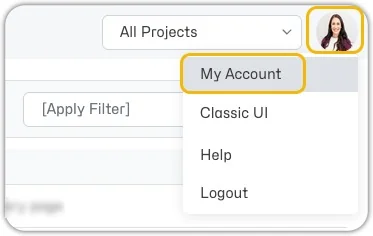
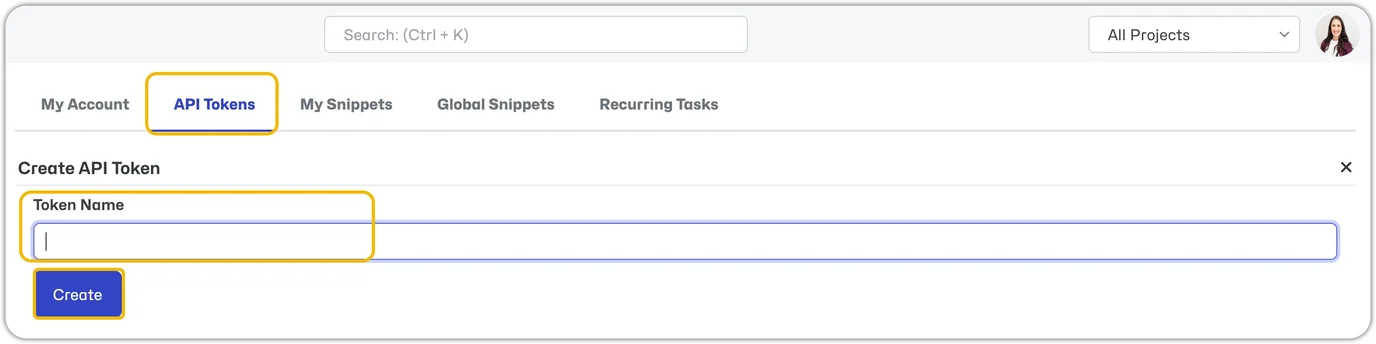
Log into your MantisHub (or as an administrator impersonate the account to create a token for), click on your avatar image in the top right-hand corner, and select "My Account" from the drop-down list. Then open the "API Tokens" tab, enter a descriptive name for the token, and click "Create".
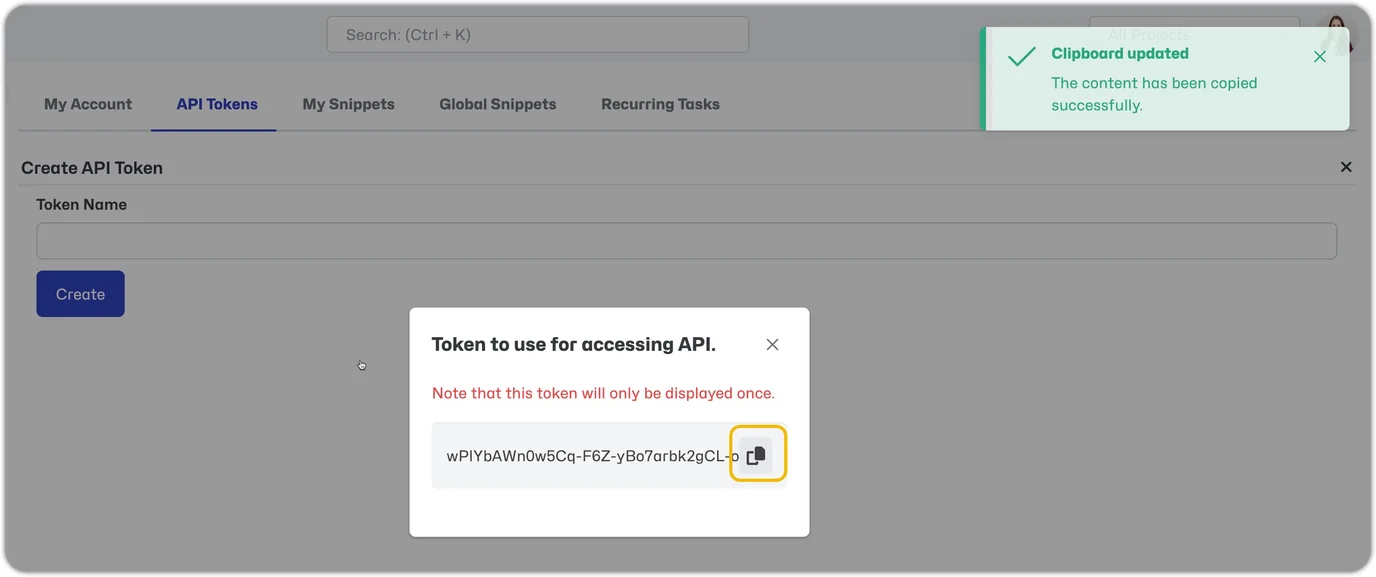
Copy and save the generated token. Be sure not to lose it, as it will only be displayed this one time. If you misplace it, you must revoke it and generate a new token.
REST Endpoint
To access the target instance, replace yourmantishubname in the URL below with the MantisHub sub-domain. Note that the URL below represents the base path for the REST API.
https://yourmantishubname.mantishub.io/api/rest/
Sample Request using curl from your terminal window.
Get all unassigned issues:
curl --request GET \ --url 'https://yourmantishubname.mantishub.io/api/rest/issues?filter_id=unassigned' \ --header 'Authorization: Bearer replace-with-user-API-token'
API Resources
- Issues - Retrieve one issue, retrieve issues matching a filter, create, delete, or update issues, add notes, tags, relationships, attachments, etc.
- Projects - Get a complete list of all projects accessible to logged-in users along with project-specific configurations like users, categories, versions, custom fields, etc.
- Filters - Retrieve all filter definitions, a single filter definition, or delete filters.
- Users - Create or delete users or retrieve your user information.
- Configuration - Retrieve one or many configuration options.
- Localized Strings - Retrieve one or many Local Strings.
The API library is still growing, so be sure to refer to the API End-point documentation for the most up-to-date API definitions.
Command Line
For command line access, we have implemented a PowerShell module based on Microsoft Powershell core, which works on Windows, Mac, and Linux.
Using curl to access the REST API from the command line is also possible. Curl is available by default for Mac and Linux distributions.
Client Libraries
You can use any HTTP or REST API library of choice for the language used to access MantisHub.
What about SOAP API?
The REST API is the recommended way to integrate with MantisHub. The SOAP API is on a deprecation path. It is recommended that integrations using SOAP API switch to REST API since SOAP API will be removed in a future release.