
Accessing MantisHub from Your Mobile Device
MantisHub users often need to access their service while on the go, away from their desktops. Instead of creating a separate app, MantisHub offers an optimized mobile interface you can access through your mobile browser. When you receive email notifications or updates via chat integration, you can simply click on the issue links to read more or take action.
When accessing MantisHub on your mobile device, you will encounter a default responsive mobile user interface (UI). This UI retains the same functionality as the desktop version but is adapted for smaller screens, ensuring you have full access to the product's features powered by the core service.
The responsive UI is designed to work seamlessly on any mobile device equipped with a modern HTML5 browser. Additionally, you can create a mobile web app for both Android and iPhone that can sit on your home screen for easy access.
You may also find some native apps developed by third-party developers in the App Store or Play Store. You can search for "Mantis Bug Tracker" to locate these apps, which will typically need to be installed or purchased by each user.
Mobile Access on Android
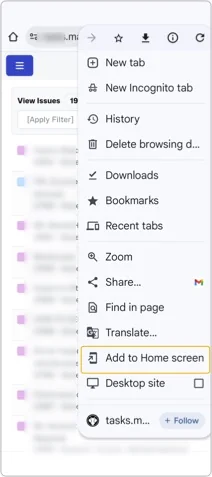
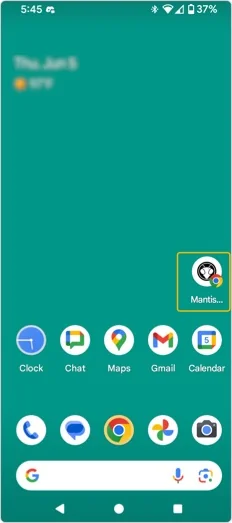
To set up a web shortcut on your Android device:
- Open the standard Android browser.
- Go to
https://yourmantishubname.mantishub.io/(withyourmantishubnameas your instance name). - Click Menu, then select "Add Shortcut to Homepage" and name it “MantisHub”.
Mobile Access on iPhone
To add a home screen icon that mimics native apps, follow these steps:
- Go to Settings -> Safari, and set “Accept Cookies” to “Always.”
- Open Safari and navigate to
https://yourmantishubname.mantishub.io/(withyourmantishubnameas your instance name). - Click the “share” arrow button and select “Add to Home Screen,” then confirm the name “MantisHub.”
- Close Safari and access the responsive mobile UI from the home screen icon.
To save your login details for mobile access, go to Settings -> Safari -> Passwords and add the site URL, username, and password. This will allow your username and password to auto-populate the next time you log in.